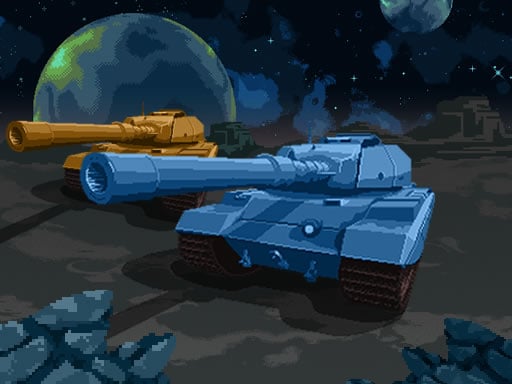
Tanks in Space is a free online shooting game you can play right here in your browser, with no download and no sign-up. The appeal of Tanks in Space is simple and old: line up the shot, take it, and watch the result. What makes it stick is the escalation that follows. From the tags you can already tell that it has touch controls and layouts made for phones and tablets.
About Tanks in Space
Prepare yourself for exhilarating tank battles across the cosmos in the thrilling online game, Tanks in Space. Set against diverse planetary backdrops, players will embark on an adventure filled with strategic combat right from the moment they select their first tank model. Each choice you make shapes your experience; therefore, selecting a planet for battle adds an engaging layer to
Judged as a shooting game, Tanks in Space hits the notes you would hope for: waves or levels that build up, satisfying hit feedback and precise aiming. Playing it works your target prioritisation and situational awareness, which is a large part of why the "one more round" feeling is so strong.
How to play Tanks in Space
- Start by clicking the big play button. Tanks in Space loads inside the frame; give it a moment, especially on a slow connection.
- Follow the on-screen prompts. The developer describes the controls like this: Use WASD keys to move Space to switch weapon Left-click to shoot For mobile use the virtual joystick on the screen
- Take a few practice shots at the first targets to learn the aim speed, then move on to prioritising the dangerous enemies.
- Use the full-screen button under the frame for the best view, and keep an eye on the score, timer or health display so you know what the game is asking of you.
Controls
Here is how Tanks in Space is controlled, based on the developer's instructions and our own testing:
| Input | What it does |
|---|---|
| WASD keys | Use WASD keys to move Space to switch weapon Left-click to shoot For mobile use the virtual joystick on the screen. |
| Space bar | Use WASD keys to move Space to switch weapon Left-click to shoot For mobile use the virtual joystick on the screen. |
| Left mouse click | Use WASD keys to move Space to switch weapon Left-click to shoot For mobile use the virtual joystick on the screen. |
| Mouse | Use WASD keys to move Space to switch weapon Left-click to shoot For mobile use the virtual joystick on the screen. |
The controls are tap and drag based, which makes it comfortable on touch screens as well as with a mouse.
Tips and tricks
- Headshots, weak points and combo multipliers are where high scores live; once survival is comfortable, start hunting for them.
- Sound tells you where an enemy is before you can see it. Headphones help more than you would expect.
- Learn the spawn points. Most levels reuse the same few entry points, and knowing them turns panic into routine.
- Aim first, then shoot. Spraying costs time or ammo and rarely helps; a single well-placed shot almost always beats three rushed ones.
- Because this is a Tanks game, angle your armour and fire while reversing.
- Because this is a Mobile game, turn on rotation lock so the screen does not flip mid-game.
Who will enjoy it
Tanks in Space is a good fit for players who like precision, quick targeting and progressively tougher waves. In terms of time, think of levels of a few minutes each, with longer runs in survival modes. The learning curve is approachable at first, with a steep climb in the later waves. The controls are tap and drag based, which makes it comfortable on touch screens as well as with a mouse.
Game details
| Category | Shooting Games |
|---|---|
| Tags | Mobile, Best Games, Battleship, Street Fighting, Strategy, Spaceship, Tanks |
| Platform | Browser (desktop, tablet and mobile) |
| Controls | Keyboard and mouse |
| Technology | HTML5 — no download or plugin required |
| Frame | Landscape (1280×720) |
| Added | 26 September 2024 |
| Plays | 1 |
| Price | Free to play |
Frequently asked questions
Is Tanks in Space free to play?
Yes. Tanks in Space is completely free to play on Diemakora. There is no download, no account and no payment — the game runs in your browser.
Can I play Tanks in Space on my phone?
Yes — the game supports touch input and adapts to smaller screens, so you can play Tanks in Space on a phone or tablet as well as on a computer.
What are the controls for Tanks in Space?
In short: WASD keys — Use WASD keys to move Space to switch weapon Left-click to shoot For mobile use the virtual joystick on the screen; Space bar — Use WASD keys to move Space to switch weapon Left-click to shoot For mobile use the virtual joystick on the screen; Left mouse click — Use WASD keys to move Space to switch weapon Left-click to shoot For mobile use the virtual joystick on the screen. The full list is in the controls section above.
Does Tanks in Space save my progress?
Progress in Tanks in Space is kept by the game itself inside your browser storage. It will normally be there when you come back on the same device and browser.
What if Tanks in Space does not load?
A blank frame usually means the game is still loading or a browser extension blocked it. Wait a few seconds, then reload; if that fails, try another browser.
What kind of game is Tanks in Space?
It is a shooting game with the tags Mobile, Best Games, Battleship, Street Fighting. Approachable at first, with a steep climb in the later waves, and levels of a few minutes each, with longer runs in survival modes.
Games similar to Tanks in Space
You will find more games like Tanks in Space further down this page, chosen by matching tags and category.